
Appearance
Setting Up a 3-Step Funnel
A 3-step funnel routes the visitor through three pages before the final conversion:
Ad → Advertorial (Lander) → Quiz (Offer slot #1) → Sales Page (Offer slot #2)How We Do It at Acentecom
Voluum's native "path" structure gives you one Lander slot and multiple Offer slots. To build a 3-step funnel, we use a small trick:
- Step 1 goes into the Landers section (the advertorial)
- Step 2 goes into the Offers section as the first offer (the quiz page)
- Step 3 goes into the Offers section as the second offer (the actual sales page)
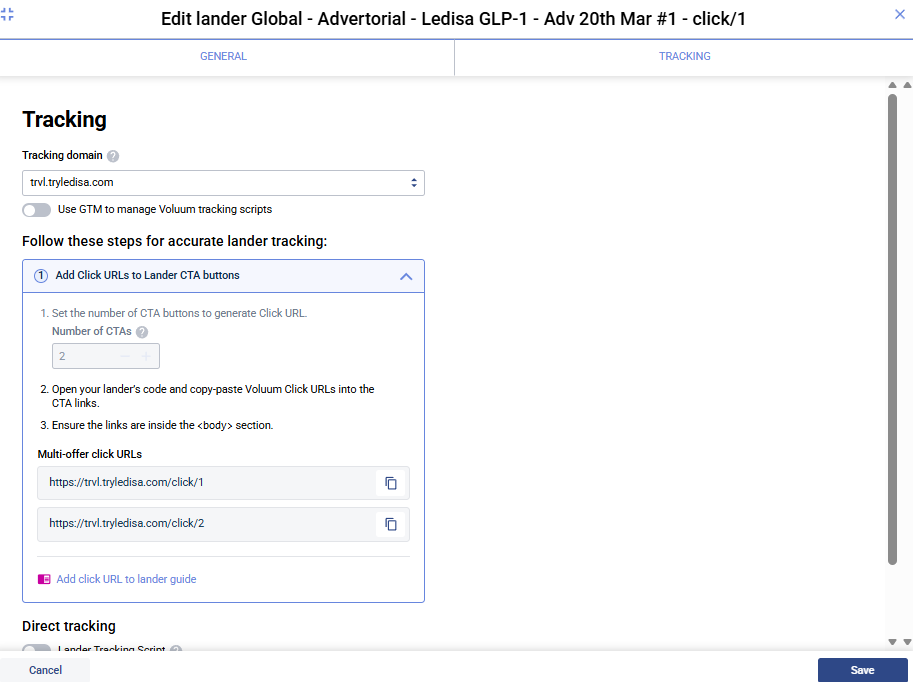
The key is that the lander is configured with 2 CTAs, which generates two numbered Click URLs. These are then split across two pages:
/click/1lives on the Step 1 page (the advertorial) → routes visitor to Step 2 (Offer 1, the quiz)/click/2lives on the Step 2 page (the quiz) → routes visitor to Step 3 (Offer 2, the sales page)
The Click URLs both come from the lander's Tracking tab, but they're physically placed on different pages — one click per step.
Real Example
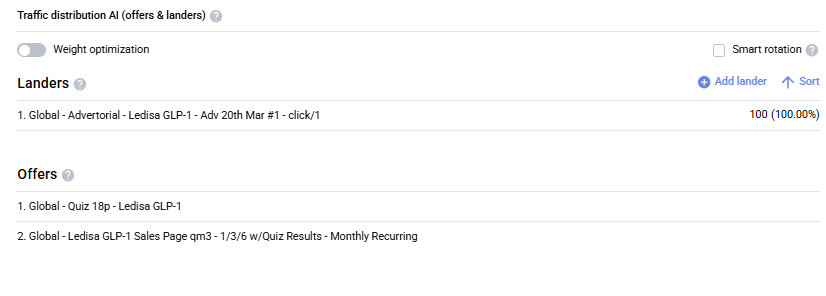
Here's how one of our 3-step paths is wired:
| Slot | Entry | Role in Funnel |
|---|---|---|
| Lander 1 | Global - Advertorial - Ledisa GLP-1 - Adv 20th Mar #1 - click/1 | Step 1 — pre-sell advertorial |
| Offer 1 | Global - Quiz 18p - Ledisa GLP-1 | Step 2 — quiz page (acts as a second lander) |
| Offer 2 | Global - Ledisa GLP-1 Sales Page qm3 - 1/3/6 w/Quiz Results - Monthly Recurring | Step 3 — final sales page |
Path name: 3-step Path
Step 1 — Create the Advertorial Lander with 2 CTAs
This is the only setup that differs from a regular lander.
- Go to Landers → Create (don't duplicate an existing 1-CTA lander — it's cleaner to make a fresh one)
- Fill in Workspace, Country label, Name, Lander URL as usual
- In the Tracking tab:
- Pick the tracking domain for the brand
- Set Number of CTAs to
2— this generates two separate Click URLs:https://[tracking-domain]/click/1https://[tracking-domain]/click/2
- Copy both
- Save
Lander must be new, not duplicated
Create the 3-step lander from scratch. Duplicating a 1-CTA lander sometimes keeps legacy click-URL config that breaks routing. Start fresh and set Number of CTAs = 2.
Place only /click/1 on the advertorial
Only Click URL #1 goes on the Step 1 (advertorial) page — this is what routes visitors from the advertorial to the quiz:
html
<!-- Advertorial CTA — routes to Step 2 (quiz) -->
<a href="https://[tracking-domain]/click/1">Read More / Find Out</a>
/click/2 is not placed here — it goes on Step 2 (see Step 3 below).
Step 2 — Build the Campaign Path
Open your campaign → Destination tab → add a default path (name it e.g., 3-step Path).
On the right panel for this path:
Landers section
Add one lander — the advertorial you just created:
Global - Advertorial - Ledisa GLP-1 - Adv 20th Mar #1 - click/1- Weight: 100 (unless you're split-testing multiple advertorials)
Offers section — in order
Add two offers in this exact order:
- First offer = Step 2 (quiz page) — e.g.,
Global - Quiz 18p - Ledisa GLP-1 - Second offer = Step 3 (final sales page) — e.g.,
Global - Ledisa GLP-1 Sales Page qm3 - 1/3/6 w/Quiz Results - Monthly Recurring
Offer order matters
The first offer in the list is where the lander's Click URL #1 routes to. The second offer is where the quiz page's own CTA routes to. Don't reorder them — it breaks the funnel.
Step 3 — Place /click/2 on the Step 2 Page (Quiz)
This is the part that trips people up: /click/2 lives on the quiz page, not on the advertorial.
The quiz page (Step 2) needs its own CTA that uses Click URL #2 — the one generated by the advertorial lander's Tracking tab:
html
<!-- Quiz page CTA — routes to Step 3 (sales page) -->
<a href="https://[tracking-domain]/click/2">See My Results</a>
When the visitor clicks this on the quiz, Voluum routes them to the second offer in the path — the Step 3 sales page.
How the numbered Click URLs work
Both /click/1 and /click/2 are generated by the lander's Tracking tab (because the lander is set with Number of CTAs = 2). But they're physically placed on two different pages:
| Click URL | Lives on | Routes to |
|---|---|---|
/click/1 | Step 1 page (advertorial) | Step 2 (Offer 1 = quiz) |
/click/2 | Step 2 page (quiz) | Step 3 (Offer 2 = sales page) |
This is what makes the three-step chain work — each step's CTA is the Click URL for the next step.
Step 4 — Test the Funnel End-to-End
- Copy the campaign URL
- Open it in an incognito window
- Verify the flow:
| Step | Expected Result |
|---|---|
| Open campaign URL | You land on the advertorial |
Click the advertorial's CTA (/click/1) | You go to the quiz page |
Click the quiz's CTA (/click/2) | You go to the final sales page |
- Check in Voluum that visits and clicks are being recorded at each step
📸 Screenshot — funnel-live-test.png
Capture Voluum reporting showing visits/clicks tracked across all three steps.
Common troubleshooting
- Stuck on advertorial →
/click/1is missing or wrong on the advertorial CTA (view page source) - Quiz loads but clicking its CTA does nothing / loops back → The quiz CTA is using
/click/1instead of/click/2— the quiz must use/click/2 - Visits show but no clicks → Tracking domain mismatch between lander and brand page. Must match (e.g., both
trvl.tryledisa.com) - Everything skips to sales page → Offer order is reversed in the path; quiz should be Offer 1, sales page Offer 2