
Appearance
Rule-Based Paths
Rule-based paths let you route visitors to different landers/offers based on conditions (GEO, region, referrer, custom variables, etc.). You can stack multiple rules in a single campaign — each rule gets its own destination, and they're evaluated top-to-bottom.
How Rule Stacking Works
Rules are processed in order. The first rule a visitor matches wins — Voluum routes them through that path and stops checking the rest. If no rule matches, the default path catches the traffic.
Order matters
Put the most restrictive / highest-priority rule on top, broader rules below, and the catch-all default path at the bottom.
Use Case A — California Split (GEO/State-Based Routing)
The simplest rule-based path: route California visitors to a dedicated path (e.g., CCPA-compliant variant), and everyone else to the default path.
Step 1 — Open Your Campaign Destination
- Open the campaign you want to edit
- Scroll to the Destination tab → Rule-based paths section
Step 2 — Add a Rule-Based Path
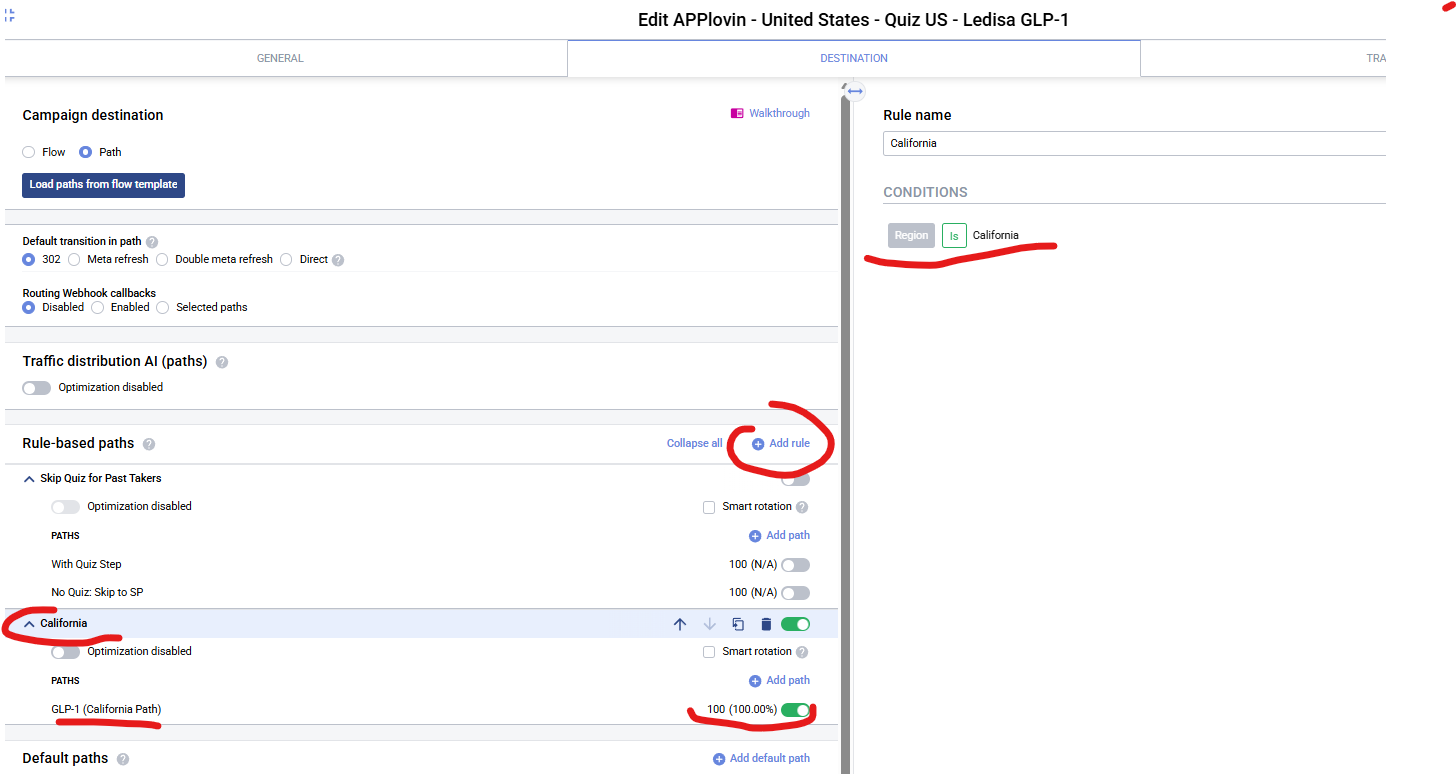
- Click "Add rule"
- A new rule section appears

Step 3 — Configure the Rule Condition
- Rule name:
California - Condition: Region IS
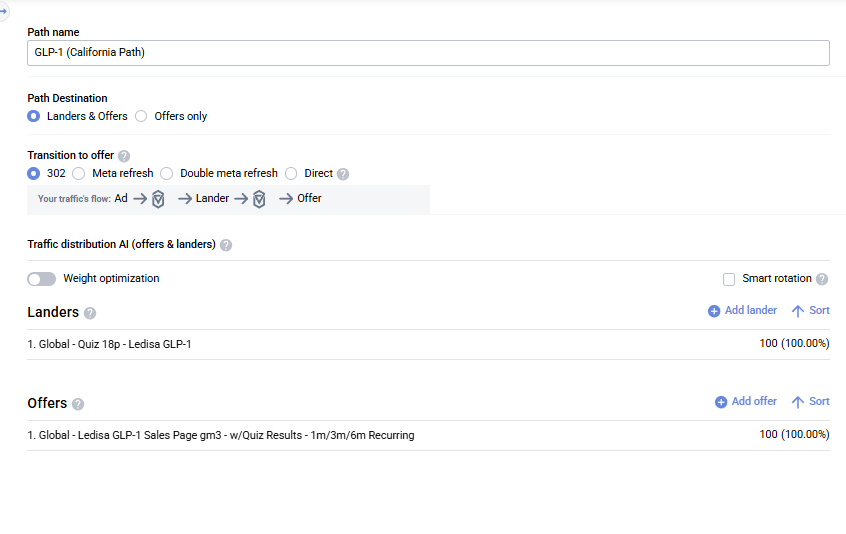
California - Path: attach a lander + offer specific to California visitors (
California Path)
Step 4 — Set Up the Default Path
The default path (already present) catches all traffic that does NOT match the California rule. Assign its own lander and offer.
Use Case B — Stacked Rules (Real Acentecom Setup)
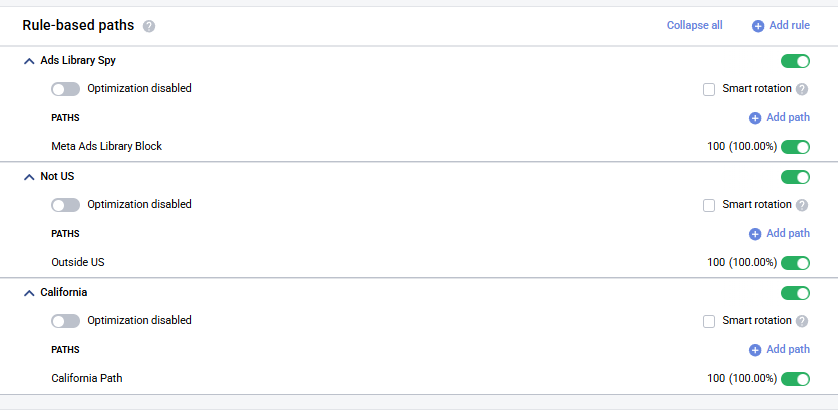
For production campaigns we often stack several rules together. Here's a real example we use:
| # | Rule Name | Condition | Path | Why It's Here |
|---|---|---|---|---|
| 1 | Ads Library Spy | Custom variable 1 does not contain ad.id AND Device type is Desktops & Laptops | Meta Ads Library Block | Stops competitors / testers spying via Meta Ad Library — see detection logic below |
| 2 | Not US | Country ≠ United States | Outside US | Non-US visitors get a different path |
| 3 | California | Region = California | California Path | CCPA-compliant variant |
| — | Default path | (anything that didn't match above) | main funnel | US non-California traffic |
How the Ads Library Spy detection works
We catch spies using two signals combined:
- No
ad.idin Custom variable 1 — a legitimate click from a Meta ad always carries anad.idquery parameter. If it's missing, the visitor didn't come from a real ad click (they typed the URL, came from Meta Ads Library preview, etc.). - Device type is
Desktops & Laptops— real paying users skew heavily mobile. Testers, competitors, and QA viewers almost always open the page on desktop.
Either signal alone has false positives (e.g., a desktop user clicking a real ad, or a mobile competitor). Combined (AND) they're a very strong indicator it's a bot / tester / competitor spy — so we route them to a dummy Meta Ads Library Block path that hides the real funnel.
INFO
This is an AND condition (both must be true). If you see a legitimate desktop ad-click bug through, relax the rule; if scrapers slip through, tighten it.
The order matters here — here's why
- Ads Library Spy on top → blocks scraping bots before they hit any real page. If this was below GEO rules, spy bots from US IPs would see our real funnels.
- Not US second → filters all international traffic out before state-level rules (California is a state inside the US, so Not-US has to run first).
- California third → among US traffic, splits off California visitors.
- Default path last → catches everything that's left: US, non-California, human.
What happens if you reorder wrong
- California above Not-US → California visitors from outside the US end up on California Path instead of Outside US.
- Not-US above Ads Library Spy → a spy bot on a non-US IP gets your Outside US funnel revealed to competitors.
- Default path above rules → all rules become dead because the default catches everything first.
Setting It Up
- Add rules one at a time in the desired order: Ads Library Spy → Not US → California
- For each rule, set its condition + attach its own lander/offer path
- Verify the default path at the bottom has the main funnel
- To reorder, grab the drag handle on the left of each rule card and drag up/down
Rule Condition Reference
Commonly used conditions at Acentecom:
| Condition | Used For |
|---|---|
| Country IS / IS NOT | GEO splits (US vs international, specific country targeting) |
| Region IS | State/province-level routing (California, Texas, etc.) |
| User Agent | Bot/spy filtering (Meta Ads Library, known scrapers) |
| Referrer IS empty / contains | Catch direct/suspicious traffic |
| Custom variable | Any flag passed from traffic source (quality score, test bucket, etc.) |
| Device / OS | Mobile vs desktop, iOS vs Android routing |
| Connection Type / ISP | Known bot networks, mobile carriers, etc. |